

Getting your website indexed by Google is a crucial step in SEO. Without indexing, your web pages won’t appear in search results, meaning no traffic, no rankings, and no visibility.
For local businesses, fast indexing is even more critical. Whether it’s a new service page, a local business listing, or a backlink strategy, waiting weeks or months for Google to recognize your content can slow down your SEO efforts.
That’s where Local SEO Rapid URL Indexer comes in. This tool is designed to accelerate the indexing process, helping businesses and SEO professionals get their pages and backlinks noticed by search engines faster than traditional methods.
In this article, we’ll break down what Local SEO Rapid URL Indexer is, how it works, its benefits, pricing, and Google’s policies on indexing APIs.
1. Understanding Local SEO and the Role of Indexing
What Is Local SEO?
Local SEO is a branch of search engine optimization focused on helping businesses appear in local search results. This includes ranking for:
- “Plumber near me” or other service-based queries.
- Google Business Profile listings (renamed from Google My Business in November 2021).
- Local citations and directory listings.
Why Is Indexing Important for Local SEO?
Google must first crawl and index your pages before they can appear in search results. If your pages or backlinks aren’t indexed, they won’t contribute to your rankings.
Common Problems with Slow Indexing:
- Local businesses are struggling to appear in Google search.
- Backlinks are taking too long to be recognized by Google.
- New pages not ranking due to delayed indexing.
This is where tools like Local SEO Rapid URL Indexer help accelerate the process.
2. What Is Rapid URL Indexer?
Rapid URL Indexer is an automated tool that speeds up the indexing process by submitting your URLs to Google and other search engines.
Unlike manual submission through Google Search Console, which can be slow and unreliable, this tool helps:
- Get new pages indexed faster.
- Ensure backlinks are recognized quickly.
- Improve visibility in search results.
It works for all types of websites, including WordPress and non-WordPress platforms.
3. How Does Rapid URL Indexer Work?
Step-by-Step Breakdown
- Enter Your URLs
- Users submit their URLs (web pages, blog posts, backlinks) that need to be indexed.
- The Tool Submits Your URLs.
- Local SEO Rapid URL Indexer notifies search engines that the URLs need to be crawled.
- Enhanced Crawling Signals
- The tool uses multiple indexing signals to get URLs noticed:
- Third-party crawl signals, not Google’s old sitemap ping endpoint. That endpoint was deprecated in June 2023 and now returns a 404, so any tool still described as “pinging Google” is describing something that no longer exists.
- Social signals
- Backlink signals
- The tool uses multiple indexing signals to get URLs noticed:
- Faster Search Engine Recognition
- Google and other search engines quickly discover and index the submitted URLs.
- URL Appears in Search Results
- Indexed pages start ranking faster, improving visibility and traffic.
4. Rapid URL Indexer WordPress Plugin
For WordPress users, Local SEO Rapid URL Indexer offers an easy-to-use WordPress plugin, available on the WordPress Plugin Directory: Rapid URL Indexer WP Plugin.
The plugin simplifies the indexing process by allowing users to submit URLs directly from their WordPress dashboard.
Key Features of the WordPress Plugin:
- One-click submission of new posts and pages for indexing.
- Automated indexing of new content.
- Simple integration with WordPress websites.
- Saves time compared to manual submission via Google Search Console.
The WordPress plugin is ideal for website owners and bloggers who frequently publish new content and want to ensure their pages are indexed quickly without manual intervention.
5. Benefits of Using Local SEO Rapid URL Indexer
- Faster indexing, Get pages and backlinks indexed in hours or days, not weeks.
- Lets your backlinks count at all, an unindexed backlink passes nothing. Getting it indexed does not add value on its own, it just lets the link do the job it was already meant to do. Note that domain authority is a Moz score, not a Google ranking factor, so treat it as a rough comparison metric rather than something you are moving.
- Supports all websites, Works for WordPress, Shopify, and other platforms.
- Saves time, No need to manually request indexing via Google Search Console.
- Enhances local SEO, Helps local businesses rank quicker in search results.
6. Who Should Use Rapid URL Indexer?
- Local business owners, Faster indexing means quicker search visibility.
- SEO professionals, Helps ensure backlink strategies work faster.
- Affiliate marketers, Get new content ranked quickly.
- E-commerce store owners, Helps product pages get indexed rapidly.
7. Pricing of Rapid URL Indexer
Local SEO Rapid URL Indexer operates on a credit-based pricing model, allowing users to purchase indexing services as needed.
Pricing Plans:
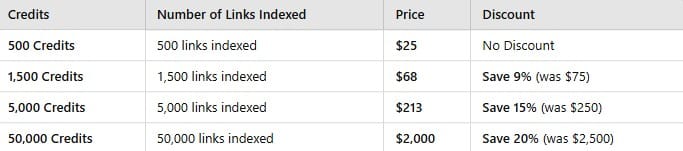
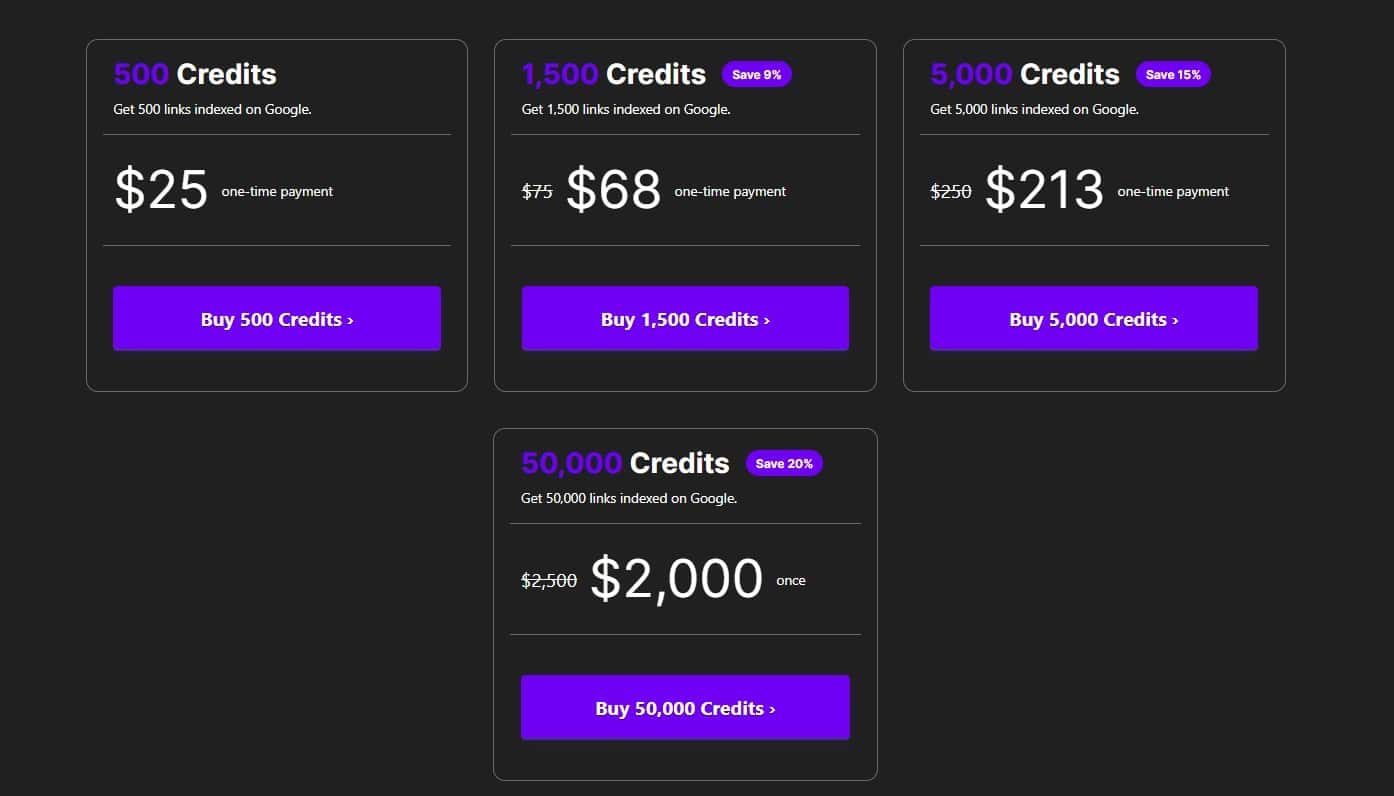
Credits are sold in one-time packages, with no subscription. As listed on rapidurlindexer.com in August 2026:
- 500 credits, $25, which works out to $0.05 per URL.
- 1,500 credits, $68, about $0.045 per URL.
- 5,000 credits, $213, about $0.043 per URL.
- 50,000 credits, $2,000, $0.04 per URL.
The discount between the smallest and largest package is only about 20%, so buying in bulk to save money is not much of an argument. Buy the small pack, test it on URLs you can verify, and scale only if it works for your sites.
The Refund Model Is the Part That Matters
The pricing detail that actually changes the decision is not the per-credit rate. It is that credits are automatically refunded for any URL that does not get indexed.
That flips the risk. With most indexing services you pay for attempts. Here you pay for results, so a batch that fails costs you time rather than money.
The vendor publishes a 91% average indexing rate and a 4 to 14 day window, with an initial report at 4 days and a final one at 14. Treat those as vendor figures, not independent measurements, but the refund policy means you can test the claim cheaply on your own URLs.
It also does not need Search Console access, which is why it works on third-party URLs like backlinks that you do not own.
8. Google’s Indexing API: What You Need to Know
While Rapid URL Indexer helps get URLs indexed faster, Google has strict rules on using its Indexing API.
What Google Allows
- Job Postings, URLs related to Google Jobs can be indexed via API.
- Livestream pages, specifically pages carrying BroadcastEvent structured data. Google Discover is not part of this, that is a separate surface with no submission API.
What Google Doesn’t Allow
- Regular website pages, blogs, and eCommerce pages.
- General local business listings and service pages.
- Backlink indexing for SEO purposes.
Instead, Google recommends sitemaps, internal linking, and manual indexing requests via Search Console.
While Rapid URL Indexer doesn’t use Google’s official Indexing API, it utilizes alternative signals to encourage faster crawling and indexing.
Frequently Asked Questions (FAQ)
1. How fast does Local SEO Rapid URL Indexer work?
Results vary, but most users see indexing happen within hours to a few days, depending on Google’s crawl schedule.
2. Is Local SEO Rapid URL Indexer safe to use?
It does not touch your site, so there is no technical risk to your rankings. But be careful with the stronger claim you will see elsewhere, that Google endorses this category of tool. It does not.
When Google shut down the sitemap ping endpoint in June 2023 it said plainly that unauthenticated submissions were not very useful and that the vast majority led to spam. That is Google’s published view of push-style indexing signals in general.
The practical read: a service like this is safe to try, but treat faster indexing as a possible outcome, not a guarantee you have bought.
3. Does Local SEO Rapid URL Indexer work for backlinks?
Yes, it helps backlinks get indexed faster, ensuring they contribute to SEO rankings more quickly.
4. How is the WordPress plugin different from manual submission?
The WordPress plugin automates indexing for new posts, whereas manual submission requires using Google Search Console each time a page is updated.
5. Can I use Local SEO Rapid URL Indexer for unlimited URLs?
The tool works on a credit-based system, so you will need to purchase additional credits when your current balance runs out. Credits for URLs that fail to index are refunded automatically, so unused effort is not billed.
6. Does Rapid URL Indexer need Google Search Console access?
No. That is the main practical difference from submitting URLs yourself, and it is why the tool can be used on backlinks and citations sitting on domains you do not own.
7. Will an indexing tool fix a page marked “Crawled, currently not indexed”?
No. That status means Google crawled the page and decided not to index it. Re-submitting does not change that decision. Improve the page, remove duplication, or add internal links from pages that already rank.
8. How much does Rapid URL Indexer cost?
Credits are sold in one-time packages starting at $25 for 500 credits, roughly $0.05 per URL, down to $0.04 per URL on the 50,000-credit package. There is no subscription, and credits are refunded for URLs that do not index.
9. Before You Buy Credits: Check Why the Page Isn’t Indexed
This is the step most articles on indexing tools skip, and it is the one that decides whether the tool can help you at all.
An indexing service solves exactly one problem: discovery. It tells search engines a URL exists. If Google has already found your page and decided not to index it, no amount of submission changes that.
Read the Page Indexing Report First
Open Search Console, go to the Page Indexing report, and find which bucket your URL sits in. The label tells you whether an indexer is the right purchase:
- Discovered, currently not indexed, Google knows the URL exists but has not crawled it yet. This is a genuine discovery and crawl-budget issue, and it is the one case where a submission tool has a real shot.
- Crawled, currently not indexed, Google fetched the page, looked at it, and chose to leave it out. Submitting it again does not change that judgment. The fix is the page, not the submission.
- Duplicate, Google chose different canonical, Google merged your page with another one it considers the original. An indexer cannot help here either.
- Excluded by noindex tag or robots.txt, you are blocking it yourself. Fix the tag or the rule, then request indexing for free.
Only the first bucket is worth spending credits on. If most of your unindexed URLs sit in the second or third, you have a content or duplication problem wearing an indexing costume, and the credits will refund without helping you.
Check Indexing Properly, Not With site:
A lot of people confirm indexing with a site: search and get a misleading answer. That operator is approximate and it drops pages that are genuinely indexed.
Use the URL Inspection tool in Search Console for pages you own, since it reports Google’s actual index status for that URL. For backlinks on domains you do not control, a site: check or a rank tracker is all you have, which is one reason a refund-for-unindexed model is useful there.
Where This Tool Genuinely Fits
The honest use case is not your own new blog posts. Those get indexed from your sitemap and internal links if they are worth indexing.
It is URLs you cannot submit yourself: backlinks, citations and directory listings on other people’s domains, where you have no Search Console access and no other lever. That is the gap this category exists to fill, and it is why the no-Search-Console requirement matters more than the speed claims.
Conclusion
Rapid URL Indexer is an effective solution for businesses and SEO professionals looking to speed up the indexing process. While Google’s Indexing API is restricted to job postings and live streams, this tool utilizes alternative SEO signals to get URLs noticed faster.
For local businesses, agencies, and marketers who need faster search visibility, this tool can provide an efficient way to accelerate indexing.